Note
Go to the end to download the full example code.
StreamPlayer: simulate an LSL stream
Testing designs for online paradigm can be difficult. Access to hardware
measuring real-time brain signals can be limited and time-consuming. With a
StreamPlayer, a fake data stream can be created and used to test code
and experiment designs.
# Authors: Mathieu Scheltienne <mathieu.scheltienne@fcbg.ch>
#
# License: LGPL-2.1
Warning
Both StreamPlayer and StreamRecorder create a new process
to stream or record data. On Windows, mutliprocessing suffers a couple of
restrictions. The entry-point of a multiprocessing program should be
protected with if __name__ == '__main__': to ensure it can safely
import and run the module. More information on the
documentation for multiprocessing on Windows.
This example will use a sample EEG resting-state dataset that can be retrieve
with bsl.datasets. The dataset is stored in the user
home directory, in the folder bsl_data.
import time

from bsl import StreamPlayer, datasets
from bsl.lsl import resolve_streams
from bsl.triggers import TriggerDef
Starting a StreamPlayer
A StreamPlayer requires at least 2 arguments:
stream_name, indicating a the name of the stream on the LSL network.fif_file, path to a validRawfif file.
stream_name = "StreamPlayer"
fif_file = datasets.eeg_resting_state.data_path()
print(fif_file)
/home/runner/bsl_data/eeg_sample/resting_state-raw.fif
Instance
To create an LSL stream, create a StreamPlayer and use the
start method.
Note
By default, the start method is blocking and will
wait for the streaming to start on the network. This behavior can be
changed with the blocking argument.
player = StreamPlayer(stream_name, fif_file)
player.start()
print(player)
<Player: StreamPlayer | ON | /home/runner/bsl_data/eeg_sample/resting_state-raw.fif>
To verify if the stream is accessible on the network, use directly pylsl:
streams = [stream.name for stream in resolve_streams()]
print(streams)
['StreamPlayer']
To stop the streaming, use the stop method.
player.stop()
print(player)
<Player: StreamPlayer | OFF | /home/runner/bsl_data/eeg_sample/resting_state-raw.fif>
Context manager
A StreamPlayer can also be used as a context manager with a with
statement. The context manager takes care of starting and stopping the LSL
stream.
with StreamPlayer(stream_name, fif_file):
    streams = [stream.name for stream in resolve_streams()]
print(streams)
['StreamPlayer']
CLI
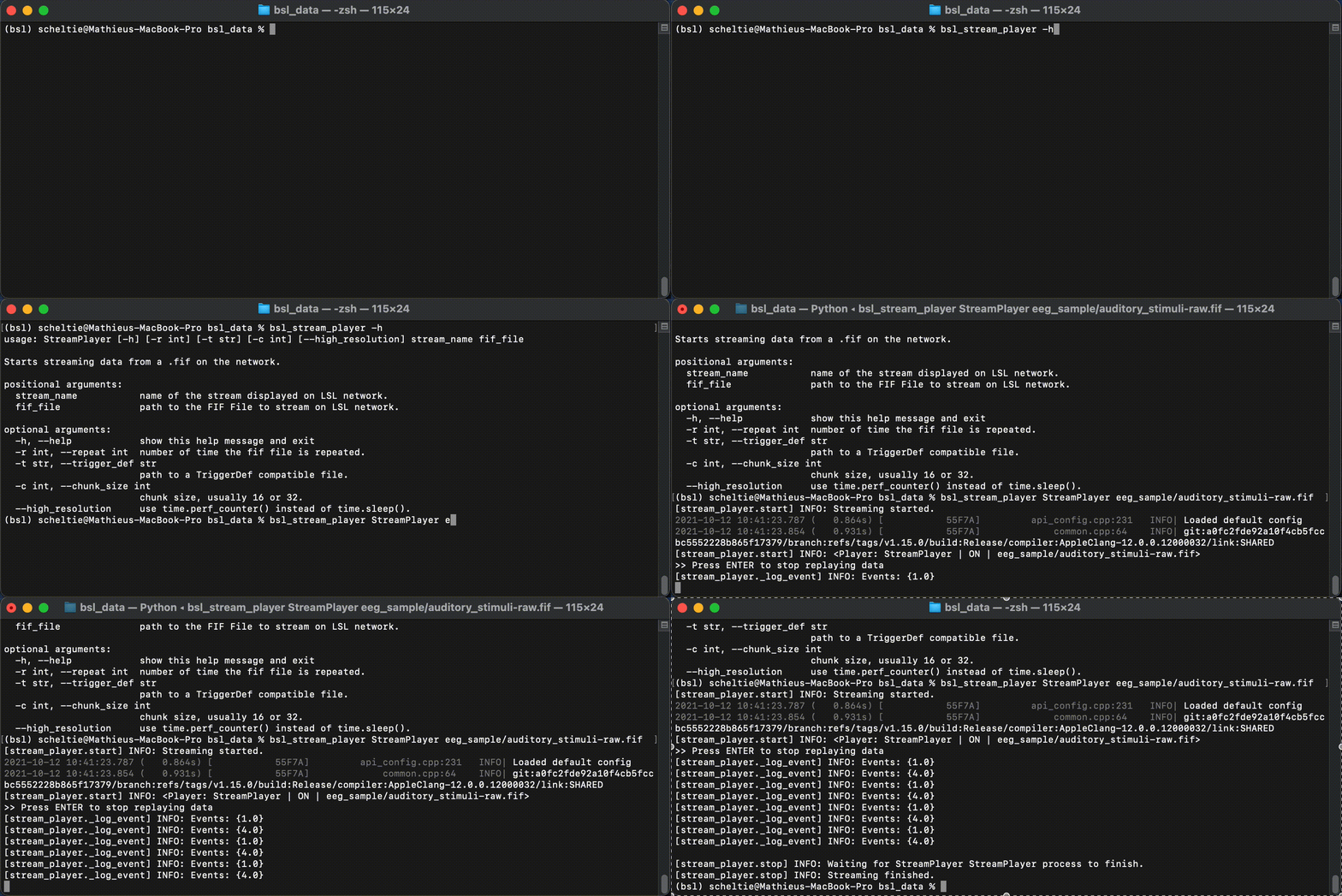
Finally, a StreamPlayer can be called from the terminal with a command
line. This is the recommended way of starting a StreamPlayer.
Example assuming the current working directory is bsl_data:
$ bsl_stream_player StreamPlayer eeg_sample\resting_state-raw.fif
Hitting ENTER will stop the StreamPlayer.
Additional arguments
A StreamPlayer has 4 optional arguments:
repeat, indicating the number of time the data in the file is repeated.trigger_def, either the path to aTriggerDefdefinition file or aTriggerDefinstance, improving the logging of events found in theRawfif file.chunk_size, indicating the number of samples push at once on the LSL outlet.high_resolution, indicating ifsleeporperf_counteris used to wait between 2 push on the LSL outlet.
repeat
repeat is set by default to +inf, returning to the beginning of the
data in the Raw fif file each time the entire file has been 2
streamed. To limit the number of replay, an int can be passed.
Note
eeg_resting_state_short is similar to eeg_resting_state but last 2 seconds
instead of 40 seconds.
fif_file = datasets.eeg_resting_state_short.data_path()
player = StreamPlayer(stream_name, fif_file, repeat=1)
player.start()
print(player)
<Player: StreamPlayer | ON | /home/runner/bsl_data/eeg_sample/resting_state_short-raw.fif>
The dataset is streamed only once. A call to the stop
method is not necessary.
time.sleep(2)  # duration of this dataset.
print(player)
<Player: StreamPlayer | OFF | /home/runner/bsl_data/eeg_sample/resting_state_short-raw.fif>
trigger_def
TriggerDef can be used to assign a user-readable string to an
event id. Providing a valid bsl.triggers.TriggerDef to a StreamPlayer
improves the logging of events found on the TRIGGER channel.
Note
eeg_auditory_stimuli contains a` alternation of rest events (1) lasting 1
second and of auditory stimuli events (4) lasting 0.8 second.
fif_file = datasets.eeg_auditory_stimuli.data_path()
player = StreamPlayer(stream_name, fif_file)
player.start()
print(player)

# wait a bit to get some events logged
time.sleep(4)

# stop
player.stop()
print(player)
<Player: StreamPlayer | ON | /home/runner/bsl_data/eeg_sample/auditory_stimuli-raw.fif>
<Player: StreamPlayer | OFF | /home/runner/bsl_data/eeg_sample/auditory_stimuli-raw.fif>
By default, the logging of events uses the ID with Events: ID. If a
bsl.triggers.TriggerDef is provided, the logging message will include the
corresponding event name if it exists with Events: ID (NAME).
tdef = TriggerDef()
tdef.add("rest", 1)

player = StreamPlayer(stream_name, fif_file, trigger_def=tdef)
player.start()
print(player)

# wait a bit to get some events logged
time.sleep(4)

# stop
player.stop()
print(player)
<Player: StreamPlayer | ON | /home/runner/bsl_data/eeg_sample/auditory_stimuli-raw.fif>
<Player: StreamPlayer | OFF | /home/runner/bsl_data/eeg_sample/auditory_stimuli-raw.fif>
Note
A path to a valid .ini trigger definition file can be passed instead
of a TriggerDef instance. The file is read with
configparser and has to be structured as follows:
[events]
event_str_1 = event_id_1   # comment
event_str_2 = event_id_2   # comment
Example:
[events]
rest = 1
stim = 2
chunk_size
chunk_size defines how many samples are pushed at once on the LSL oulet
each time the StreamPlayer sends data. The default 16 should work
most of the time. A warning is emitted if the value is different from the
usual 16 or 32.
high_resolution
Between 2 push of samples on the LSL outlet, the StreamPlayer waits.
This sleep duration can be achieved either with sleep or with
perf_counter. The second is more precise, but also uses more CPU.
Total running time of the script: (0 minutes 16.041 seconds)
Estimated memory usage: 264 MB